Single-wall toolpaths
- Dedicated single-wall slicing
- Configurable layer height and extrusion width
- Movement speed tuned to the process
Porcelain 3D printing
Prepare your models in a dedicated porcelain slicing app. Configure deposition settings, preview single-wall paths, and generate continuous spiral toolpaths for compatible geometries.
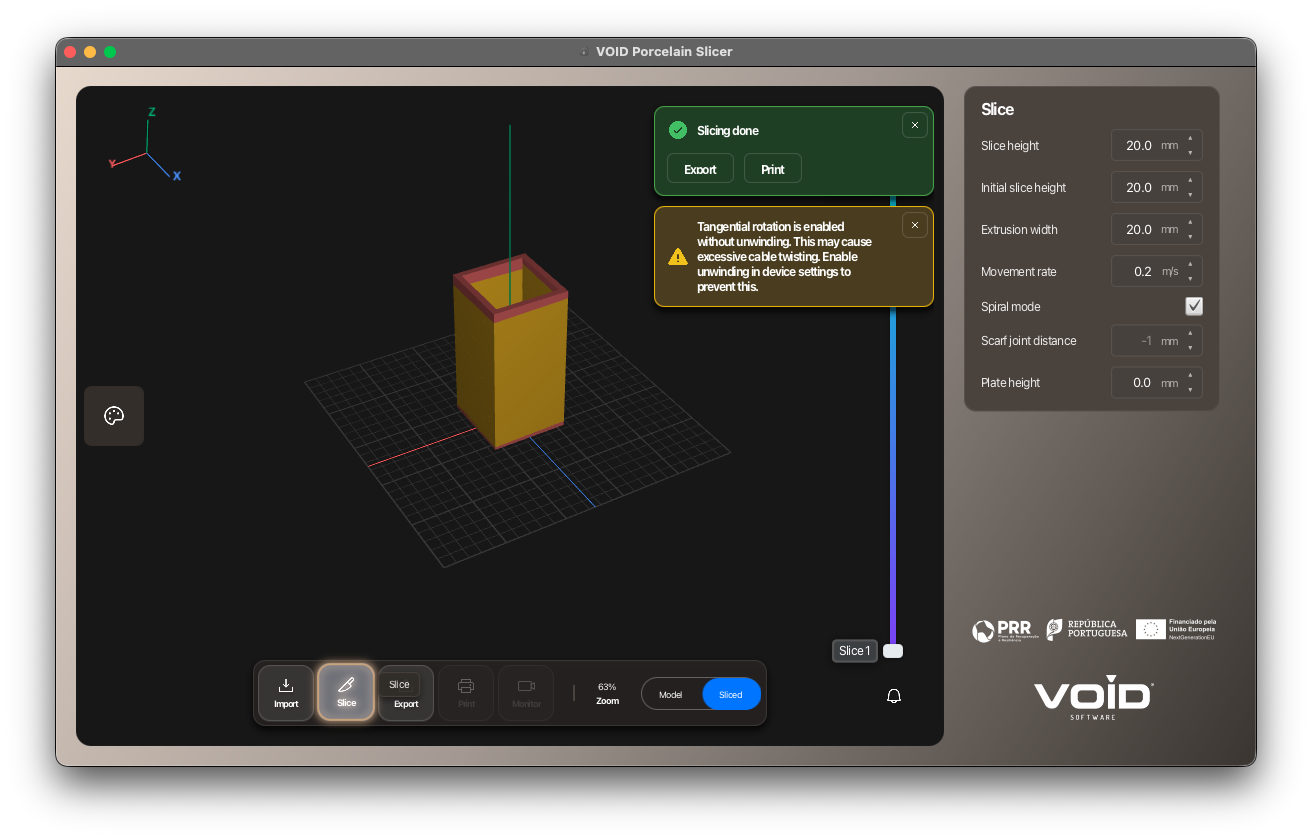
Load a 3D model and check its geometry and dimensions in the application.
Set layer height, extrusion width, movement speed and bed height. Enable spiral mode when the geometry supports it.
Inspect the generated single-wall paths and export the print instructions for your configured equipment.
Developed with AMCubed's porcelain workflow in mind, the app combines the extrusion approach used in food printing with trajectory capabilities developed for cement.
Model import, visualization and toolpath generation build on the same foundation as Void's other printing applications.
The porcelain app is prepared for a Duet3D-based prototype, with settings adapted to its extrusion workflow.
The application and its toolpaths have been demonstrated. Full validation on the physical porcelain prototype remains the next step.
Spiral printing depends on the geometry. Preview the generated paths to assess whether continuous single-wall deposition suits your model.
The app includes preparation for two-head configurations. Material combinations and physical operation require validation with the specific equipment.
Contact Void using the email below to discuss your porcelain material, printer configuration and evaluation requirements.